Quick Summary
1. Get url from oData feed + Module name
i.e. https://core.stratawise.com/odata/1450/ISG Cost Center Form_Tasks
2. Confirm columns and column formats to ingest
3. Submit request using the MAI Request Form
Deere has the ability to ingest Stratawise directly into the EDL for more efficient consumption. This process is recommended if data is being manually exported frequently for adhoc reporting, multiple data sources are being ingested frequently through Power BI, Tableau, etc, or the ingest performance is beginning to degrade due to the amount of data being accumulated in the Module.
Define URL for the Request
1. To retrieve the url, select the Access OData option through the export icon in the header of the Grid for the Module in scope and copy the url
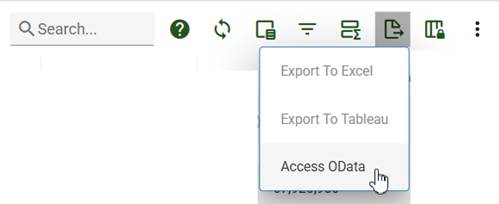
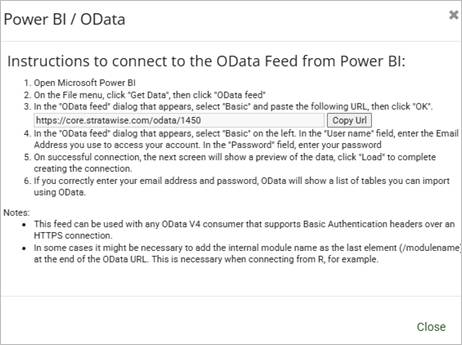
2. Define the suffix of the url
- The Module name will go directly after the tenant value (in this example after 1450).
Below are examples of the suffix for both parent and subtask requests.
Parent items example (most modules):
- The Module name in this example is ISG Cost Center Form
- The Module name will go directly after the url. Be sure to include the “ / ”
“https://core.stratawise.com/odata/1450/ISG Cost Center Form”
Subtask items example:
- The Module name in this example is ISG Cost Center Form
- The Module name + “_Tasks” will go directly after the url. Be sure to include the “ / ”
“https://core.stratawise.com/odata/1450/ISG Cost Center Form_Tasks”
Define columns and column formats to be ingested
Method 1: Ingest all columns
- The benefit of using this method is that it ensures all columns will be available for consumption for all potential uses. However, ingesting all columns into downstream platforms like Power BI and Tableau is not recommended. Therefore, once the EDL schema is created it is recommended to develop custom schemas in Databricks based on the source data in EDL to reduce the amount of data ingested into downstream platforms. This will require the product owner of the data to be familiar with basic SQL or Python.
If using this method, skip items 1 - 4 below.
Method 2: Ingest only required columns
- The benefit of using this method prevents the ingest of technical columns unnecessary for consumption. However, if using this method it is recommended the analysis below be completed thoroughly to ensure only the required columns are needed. This method creates a risk of potentially missing required column(s) that may be needed in the future. If this occurs, a new request will have to be submitted to ingest the column(s).
If using this method, complete items 1 - 4 below.
1. Retrieve the column names and formats from Power BI
This can be achieved by using the Power Query code at the bottom of these instructions to get the best visibility to the data MAI will be accessing. This will return all available columns and the detected format that will be used for the additional analysis below.
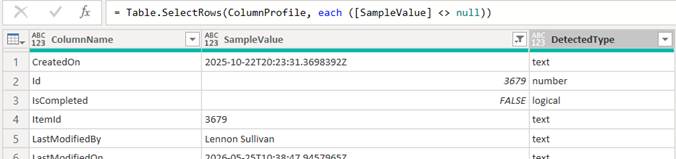
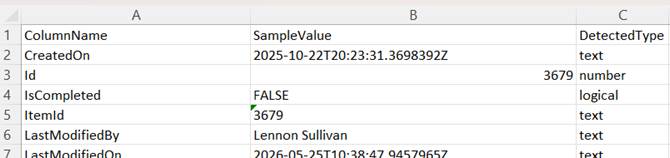
Note: This is also a good opportunity to confirm the most appropriate column names. Once this list is confirmed, any changes to the System Name will cause the EDL ingest to fail. |
4. Save the Excel file as the suffix of the url defined above. This will be the name of the schema in the EDL once completed
Example: “ISG_Cost_Center_Form.xlsx or ISG_ Cost_ Center_Form_Tasks.xlsx”
Submit request to MAI
Although Stratawise can assist with the preparation process above, the request itself has to be submitted by Deere clients since the SharePoint site is managed by Deere.
All requests are submitted through Deere’s SharePoint site below. Each request will be prioritized based on business case, estimated cost savings, and current backlog.
Industrial Intelligence Request Form:
https://deere.sharepoint.com/sites/MAI-Team/SitePages/MAI-Request-form.aspx?csf=1&web=1&e=dYHXX7
1. Provide the Request Description, including requested ingest frequency (daily, weekly, etc), oData link, schema name, EDL folder, and any additional information required.

Example Request Description
Import oData Link: https://core.stratawise.com/odata/1450/ISG Cost Center Form_Tasks Requested Schema Name: ISG_Cost_Center_Form_Tasks Affected Units: PC01 Import Frequency: Daily Selected Columns: All* Notes: Master Excel columns and format list available to share upon request. Project Folder: ‘ISG R&D Portfolio' |
2. Provide a Business Value Statement to capture the business value (i.e. estimated cost savings) and impact to business.

Once the request is submitted to MAI, a product owner will contact the requester to confirm the details and approve the request. The entire process from request submission to completion may take up to 6 weeks.
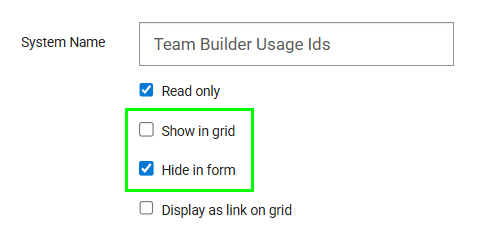
Caution: Once the EDL schema is created, deleting columns from the Module or renaming the System Name will cause the EDL ingest to fail. |
- If columns are no longer needed, it is recommended to select the Hide in form option and deselect the Show in grid option. This will have the same effect as deleting since they will no longer be visible to end users. Once this step is completed, a follow up request can be submitted through the SharePoint site to officially delete the column. Once this is complete and confirmed, the column may be deleted from the Module.
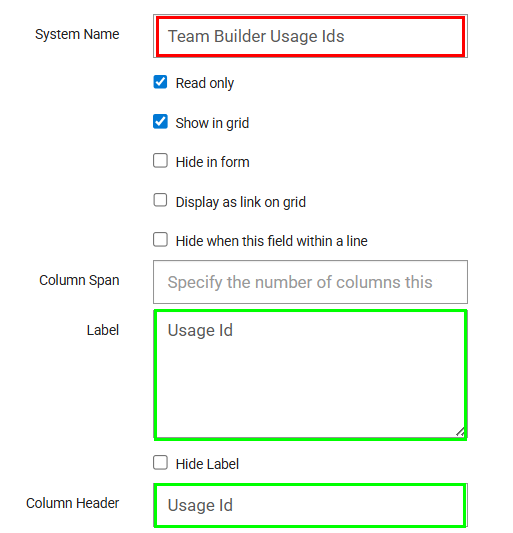
- If a column needs to be renamed, it is recommended the Label or Column Header are changed instead of the System Name. This will have the same effect as renaming the System Name since the label and Column Header is what is displayed to end users (Label is what is displayed in the forms, and Columns Header is what is displayed in the grids).
Power Query to Retrieve All Columns and Displayed Formats for Analysis
Only a single Id is used for this query. Select an item in the Module with the most amount of column values included to get the best return. In the example below, the Id chosen is 9322.
let
ODataFilter = "Id eq 9322",
BaseUrl = "https://core.stratawise.com/odata/1450/ISG Cost Center Form_Tasks",
BaseQuery = ODataFilter,
Options = [
Query = [
#"$filter" = BaseQuery,
#"$top" = "1"
],
Headers = []
],
RawData = Web.Contents(BaseUrl, Options),
Json = Json.Document(RawData),
Value = Json[#"value"],
SourceTable =
Table.FromList(
Value,
Splitter.SplitByNothing(),
null,
null,
ExtraValues.Error
),
#"Expanded Column1" =
if Table.RowCount(SourceTable) = 0 then
SourceTable
else
Table.ExpandRecordColumn(
SourceTable,
"Column1",
Record.FieldNames(SourceTable{0}[Column1]),
Record.FieldNames(SourceTable{0}[Column1])
),
GetDetectedType = (v as any) as text =>
if v = null then
"null"
else if Value.Is(v, type text) then
"text"
else if Value.Is(v, type number) then
"number"
else if Value.Is(v, type logical) then
"logical"
else if Value.Is(v, type datetime) then
"datetime"
else if Value.Is(v, type date) then
"date"
else if Value.Is(v, type time) then
"time"
else if Value.Is(v, type list) then
"list"
else if Value.Is(v, type record) then
"record"
else
"other",
ColumnNames = Table.ColumnNames(#"Expanded Column1"),
ColumnProfile =
Table.FromRecords(
List.Transform(
ColumnNames,
each
let
ColumnName = _,
Values = Table.Column(#"Expanded Column1", ColumnName),
NonNullValues = List.RemoveNulls(Values),
SampleValue =
if List.Count(NonNullValues) > 0 then
NonNullValues{0}
else
null,
DetectedType = GetDetectedType(SampleValue)
in
[
ColumnName = ColumnName,
SampleValue = SampleValue,
DetectedType = DetectedType
]
)
)
in
ColumnProfile
Was this article helpful?
That’s Great!
Thank you for your feedback
Sorry! We couldn't be helpful
Thank you for your feedback
Feedback sent
We appreciate your effort and will try to fix the article